AIOps: our experience rolling out HolmesGPT across three projects
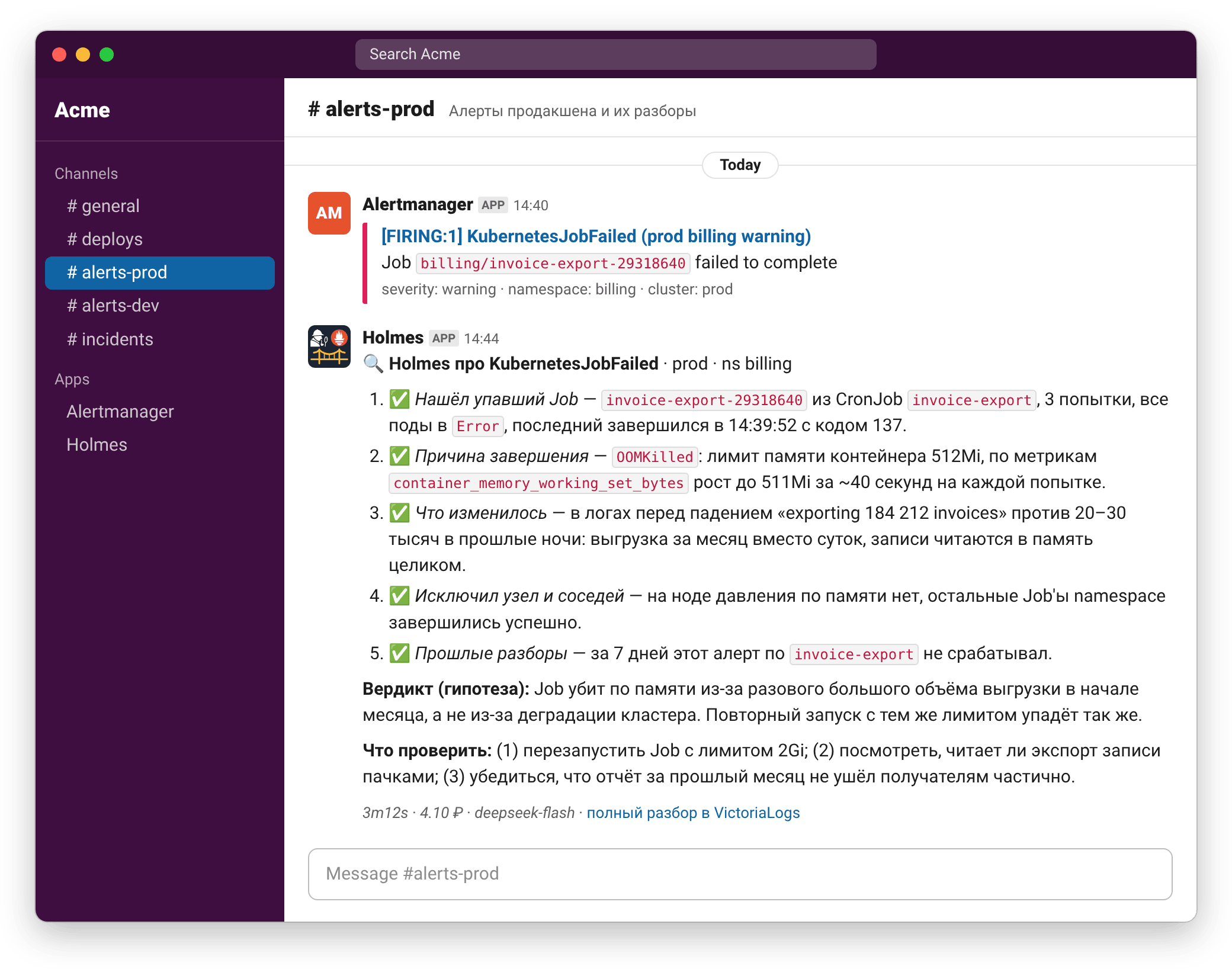
An alert lands in the chat with no context. "Pod is restarting", "queue is full", "Job failed" — and the on-call engineer always starts the same way: open a dashboard, find the Pod, scroll through the logs, try to remember what was deployed the day before. This first-pass investigation almost always follows the same pattern, and that's exactly the part we handed over to an agent.
We've deployed HolmesGPT, an open-source SRE agent, in six Kubernetes clusters: Tuna's own cluster and five clusters belonging to clients we provide managed DevOps for. There are two client projects: one runs in a Russian cloud, the other is an international project based outside Russia that runs on two clouds.
Along the way, we had to write our own tool, holmes-alert-bridge, because the open-source version of HolmesGPT has no ready-made Alertmanager integration. The bridge receives an alert, filters out the noise, passes the alert to the agent along with context and brings the investigation back to the chat; we've open-sourced the code. Now, a few minutes after an alert fires, a hypothesis appears next to it: what's happening, why and what to check. Below is how it works, what it costs and what we learned in the first month.
- HolmesGPT is an open-source SRE agent from the CNCF Sandbox: it queries Kubernetes, metrics and logs on its own and comes up with a hypothesis about what caused an alert.
- The open-source version has no built-in push integration with Alertmanager, so we wrote and open-sourced holmes-alert-bridge.
- Our agent only reads and only forms hypotheses. It can't fix anything — we didn't let it.
- An investigation takes 2–3 minutes and costs a few rubles or 10–30 cents, depending on the model.
- Before rolling it out, check your logs for passwords, tokens and personal data: everything the agent reads goes to the model provider.
Why we need it
An alert rule only knows what its expression says: a metric crossed a threshold. It doesn't know why, and the annotation advising you to "raise the limit" was written once to cover every case. The on-call engineer gets the signal and spends the first few minutes gathering context before they can start thinking.
HolmesGPT covers exactly this stretch. When an alert comes in, the engineer doesn't start the investigation from scratch: they already have a theory of what's going on, a list of what has been checked and two or three steps to confirm or rule out the theory. Across recent episodes, the median time from the alert firing to a finished report in the chat is about four minutes, including Alertmanager's grouping delay.
Here's what it looks like in one real episode in Tuna — we go through it in detail below, in the case studies. The chart is built in our Grafana from ordinary metrics: the expression from the alert rule, the ALERTS series and the bridge counters.
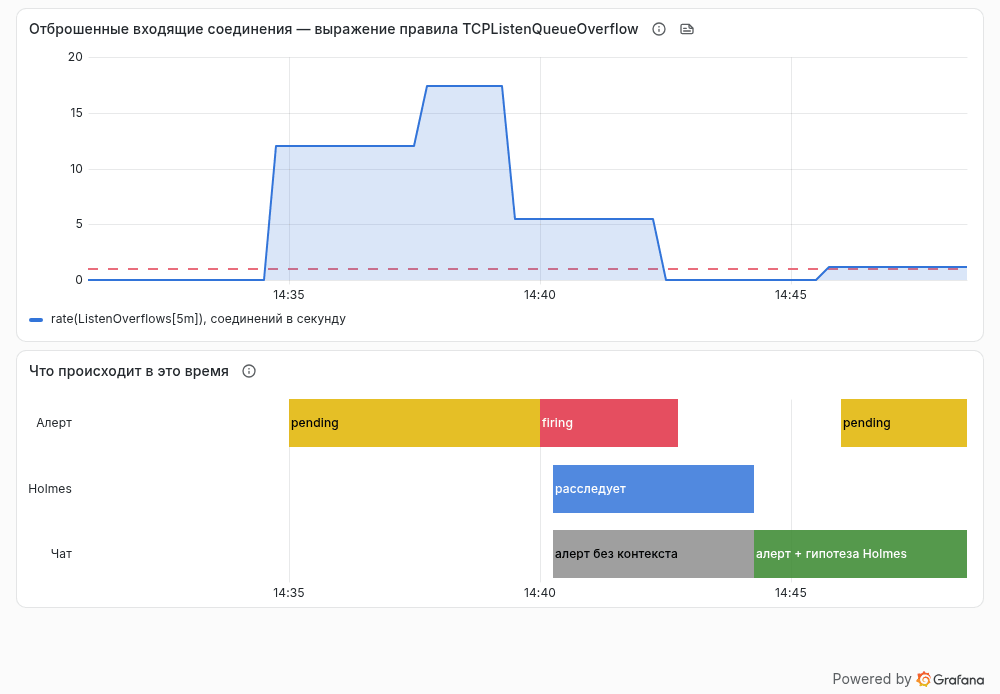
| Time | What happened |
|---|---|
| 14:34:49 | the metric crossed the threshold and the alert went into pending: the rule has for: 5m |
| 14:39:49 | the alert fired; 10 seconds later, Alertmanager sent a message to the chat and a copy to the bridge |
| 14:39:59 | Holmes started investigating |
| 14:42 | the spike ended and the alert resolved |
| 14:44:07 | the investigation and its hypothesis were posted to the chat — 4 minutes 17 seconds after the alert fired |
Just over nine minutes passed from the start of the problem to the hypothesis, and five of them were spent waiting on the rule itself. By then the alert had already resolved, but now it's clear what happened and whether anything needs to be done.
We made three decisions right away.
Hypotheses only, no auto-remediation. HolmesGPT itself can do more: give it write permissions and describe actions in skills, and it will not only look for the cause but fix it too. We leave this off on purpose: the agent only has read permissions, and its answer is labeled as a hypothesis, not a diagnosis.
Our quality figure is just an estimate, and we say so. In our experience, the hypothesis turns out to be correct in 90–95% of cases. That's a gut feeling from on-call shifts, not a measurement: we haven't started systematically comparing investigations against the actual causes of incidents yet.
Every alert costs money. This is an unexpectedly useful side effect. Once a recurring alert shows up as a line item on the bill, you're much more motivated to fix it for good instead of turning a blind eye to it for the hundredth time.
The three setups differ, which makes them easy to compare:
| Tuna | Project in a Russian cloud | International project on two clouds | |
|---|---|---|---|
| Clusters | 1 | 2 | 3 |
| Model | DeepSeek V4.1 Flash | DeepSeek V4.1 Flash | Claude Sonnet 5 |
| How it's connected | OpenRouter | Selectel AI Router | directly via the model provider |
| Where the investigation goes | Telegram | Slack | Slack |
What HolmesGPT is
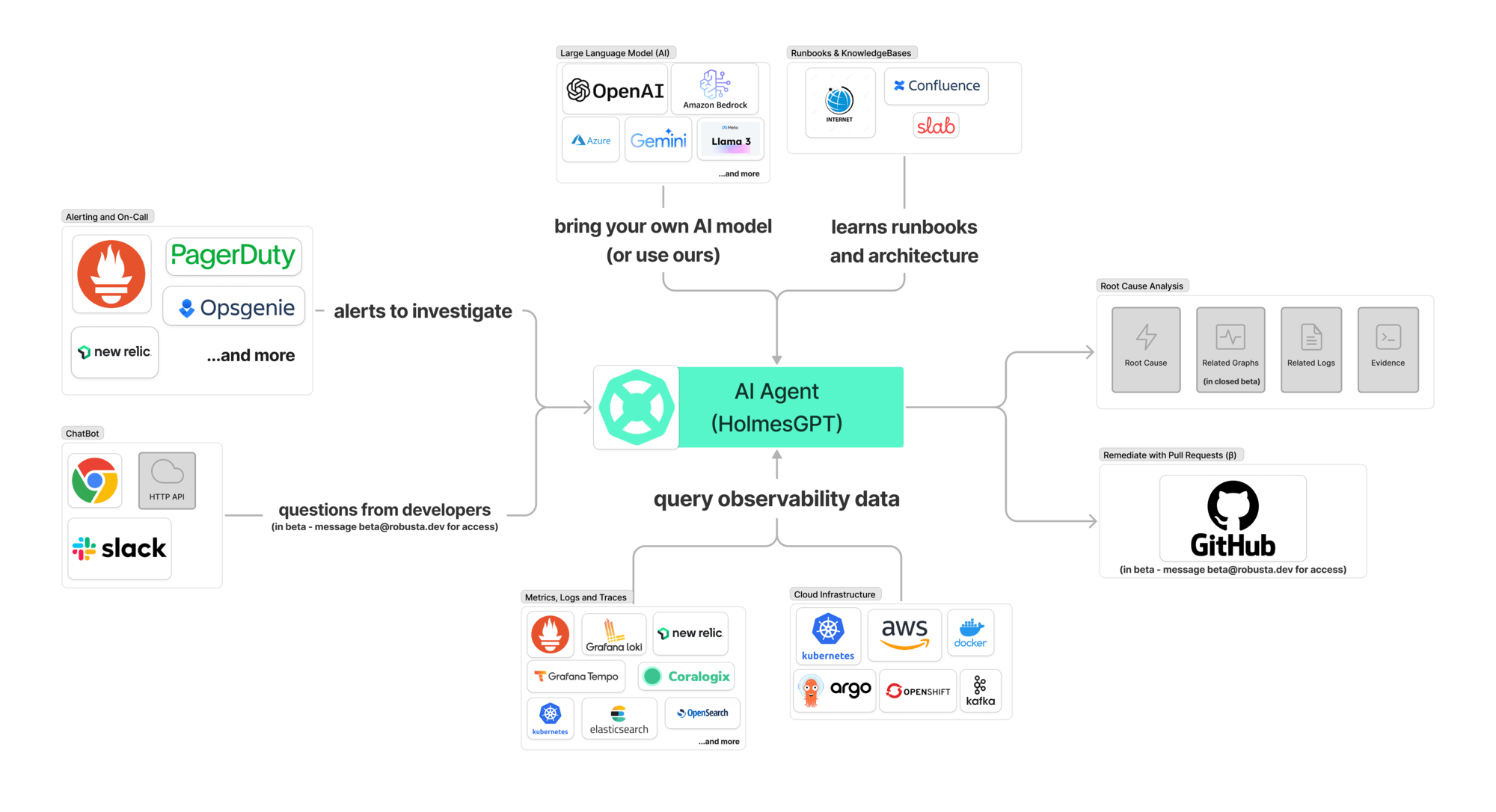
HolmesGPT is an agent for investigating problems in cloud infrastructure. It's licensed under Apache 2.0, was created at Robusta.dev and is developed with substantial involvement from Microsoft; since October 2025, it has been part of the CNCF Sandbox. It has about 3,500 stars on GitHub, and releases come out every one to two weeks — thirteen in the last four months. We use versions 0.41–0.42.
Inside is a classic agent loop: the model gets a question, decides which tool to call, reads the result, calls the next one — and so on until it has an answer. A single alert takes twenty to thirty tool calls, and tangled cases come close to a hundred. It's built from four parts:
- Toolsets — sets of tools: Kubernetes (resources, Pod logs, metrics), Prometheus, VictoriaLogs, ArgoCD, Grafana, network reachability checks and others. You can describe your own toolset as a YAML file with scripts, write it in Python or plug it in as an MCP server.
- Skills — what used to be called runbooks: a
SKILL.mdfile with a name and a description. The agent sees only the descriptions and loads the full text when it needs it. This is where knowledge about your project lives. - Model — anything litellm can reach: Anthropic, OpenAI, Azure, Bedrock, Gemini, Ollama, OpenRouter and any OpenAI-compatible API.
- Ways to run it — a CLI with an interactive console, an HTTP server with a Helm chart, a Kubernetes operator (still in alpha) and a Python SDK.
How we deploy it
We run it inside Kubernetes, with a separate installation per cluster. That way there's no need for complex authorization: the agent runs under its cluster's ServiceAccount with read-only permissions and sees nothing outside that cluster. You can also run Holmes on a dedicated server — from the CLI or docker-compose with a kubeconfig — but running it in the cluster is simpler.
A minimal values.yaml:
additionalEnvVars:
  - name: MODEL                       # key of the modelList entry
    value: fast
  - name: OVERRIDE_MAX_CONTENT_SIZE   # context window, see "Pitfalls"
    value: "400000"
  - name: OPENROUTER_API_KEY
    valueFrom:
      secretKeyRef:
        name: holmes-llm
        key: OPENROUTER_API_KEY

modelList:
  fast:
    model: openrouter/deepseek/deepseek-v4.1-flash
    api_key: "{{ env.OPENROUTER_API_KEY }}"
    temperature: 0.5
    extra_body:
      provider:
        zdr: true                     # see "Data and security"

toolsets:
  kubernetes/core:
    enabled: true
  kubernetes/logs:
    enabled: true
  prometheus/metrics:
    enabled: true                     # + config with the Prometheus URL
  victorialogs:
    enabled: true                     # + config with the URL and credentials
  skills:
    enabled: true
  # explicitly disable anything that can write or reach the outside world
  bash:
    enabled: false
  internet:
    enabled: false
  robusta:
    enabled: false

enableTelemetry: false
helm repo add robusta https://robusta-charts.storage.googleapis.com
helm upgrade --install holmes robusta/holmes -n holmes --create-namespace -f values.yaml
Resource usage is modest: Holmes takes about half a gigabyte of memory for us, with spikes caused by tools like kubectl on large lists.
Not just alerts
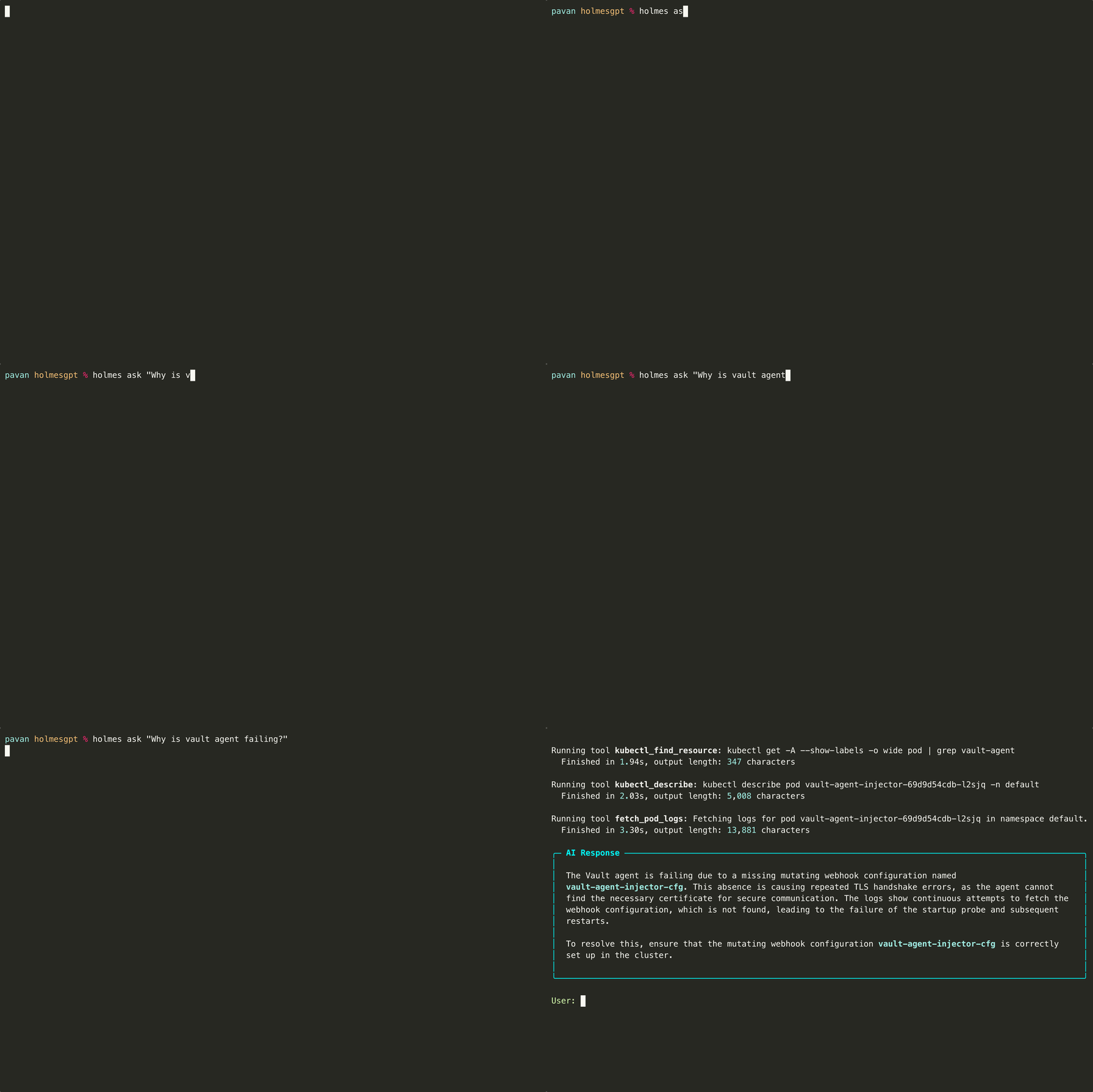
You can also ask the agent questions by hand — handy when there's no alert but there is a question. Use the CLI (holmes ask "...") or query the installation in the cluster directly:
kubectl -n holmes port-forward svc/holmes-holmes 8080:80
curl -s localhost:8080/api/chat -H 'Content-Type: application/json' \
  -d '{"ask": "Why is the checkout Pod in the shop namespace restarting?"}' | jq -r .analysis
In the console, it looks like this:
A bridge to Alertmanager
Here we were in for a surprise. The open-source version of HolmesGPT can only pull alerts: the holmes investigate alertmanager command reads the active alerts once and investigates them. The HTTP server has no webhook receiver; an alert trigger for the operator is still only planned; and automatic investigations in the Robusta product go through their SaaS platform.
What we needed was simple: Alertmanager sends a webhook, and a couple of minutes later an investigation shows up in the same chat. That's how holmes-alert-bridge came about — a small Go service under the Apache 2.0 license.
Almost everything the bridge does is about protecting the budget and everyone's nerves:
- Responds with 200 right away. Holmes takes minutes to think, and Alertmanager won't wait that long. The investigation runs in the background.
- Allowlist by alert name. With an empty list, the service refuses to start: investigating everything means a bill from the provider for every flapping alert.
- Deduplication by episode. An episode is the alert name, namespace and start time. Repeated deliveries of the same episode are ignored. For failed CronJobs, the key is the CronJob name; otherwise, every new run would be a new episode.
- Throttling. By default, no more than two investigations per hour and ten per day. This is a spending cap, not performance tuning.
- A single worker. Investigations run strictly one at a time, and the service always has exactly one replica.
- A timeout that cuts the stream. The agent's response is read as a stream, so after 15 minutes the bridge drops the connection, and Holmes stops at the end of its current step instead of finishing the job in the background at your expense.
- State in a database. Deduplication and throttling marks survive a restart: SQLite by default, or PostgreSQL or MySQL if you already have one.
- Delivery. Slack, Telegram, email or any webhook. The agent's Markdown is converted to the channel's markup, and a long investigation isn't truncated but split into parts. Below the investigation are the duration, cost, model and a link to the full record in VictoriaLogs.
How much this filters out: in Tuna, Alertmanager delivered 645 alerts to the bridge in the first month, and 41 of them reached the agent — deduplication, the allowlist and throttling took care of the rest. The picture is the same in the other setups: over 90% of deliveries don't trigger an investigation.
Here's what a finished report looks like — it's the same picture as at the beginning of the post:
Installation
You need a working HolmesGPT installation in the cluster and a list of alerts worth investigating.
helm repo add holmes-alert-bridge \
  https://gitlab.com/api/v4/projects/yuccastream%2Fholmes-alert-bridge/packages/helm/stable
helm upgrade --install holmes-alert-bridge holmes-alert-bridge/holmes-alert-bridge \
  -n holmes -f values.yaml
config:
  alertAllowlist:
    - KubernetesPodCrashLooping
    - KubernetesJobFailed
    - InstanceDown
  holmesUrl: http://holmes-holmes.holmes.svc:80
  holmesModel: fast            # key from the Holmes modelList
  promptLang: ru
  clusterName: prod
  environment: production
  costCurrency: USD
  maxPerHour: 2
  maxPerDay: 10
  telegram:
    chatId: "-1001234567890"
  victoriaLogs:
    uiUrl: https://logs.example.com
    streamFilter: '{app="holmes-alert-bridge",cluster="prod"}'

existingSecret: holmes-alert-bridge-secrets   # TELEGRAM_BOT_TOKEN and the rest
On the Alertmanager side, add a receiver and a route with continue: true so the investigation supplements the regular notification instead of replacing it:
receivers:
  - name: holmes
    webhook_configs:
      - url: http://holmes-alert-bridge.holmes.svc:8080/webhook
        send_resolved: false

route:
  routes:
    - receiver: holmes
      matchers:
        - severity =~ "warning|critical"
      continue: true
If your routing tree has no explicit catch-all, continue can take delivery away from alerts that used to fall through to the root receiver. In that case, it's easier to add the bridge to your existing receivers as a second entry in webhook_configs — that's what we did in four of the six clusters, leaving all the filtering to the allowlist.
Everything else — channels, secrets, custom prompt and message templates — is covered in INSTALL.md.
Models and budget
How we chose
The pilot started in the Russian cloud project, and the very first run — on glm-5.2 — was a wake-up call: a single question used up more than a million input tokens, and the investigation cost dozens of rubles. The agent takes dozens of turns, and every turn resends the entire accumulated history to the model.
So we held a selection round: eight models, 52 runs in three waves, including a task with a known answer. We looked at inexpensive models first: monitoring shouldn't cost more than the thing it's watching. We added a couple of higher-tier models for comparison.
| Model | Runs | Failures | Known-answer task | Cost per run |
|---|---|---|---|---|
qwen3.7-flash | 6 | 1 | 0 of 1 | ≈ 3 ₽ |
gpt-5.6-luna | 4 | 0 | 0.5 of 2 | ≈ 6 ₽ |
deepseek-v4-flash-0731 | 16 | 0 | 4 of 4 | ≈ 16 ₽ |
minimax-m3 | 6 | 1 | 0 of 1 | ≈ 24 ₽ |
gemini-3.7-flash | 4 | 1 | 1 of 1 | ≈ 41 ₽ |
longcat-2.0 | 4 | 0 | 0 of 2 | ≈ 42 ₽ |
glm-5.2 | 6 | 0 | 2 of 2 | ≈ 54 ₽ |
deepseek-v4-pro-0813 | 6 | 0 | 2 of 2 | ≈ 77 ₽ |
What we learned:
- You can't compare models on a single run. A price gap that looked like an order of magnitude on the first run shrank to a factor of several over fifty runs: the spread within a single model turned out to be larger than the difference between models.
- A cheap model doesn't mean a cheap investigation. Half of the candidates failed the known-answer task, and in the same way: they confidently reported that the component in question wasn't in the cluster. It was a managed autoscaler, which really isn't visible among the Pods.
deepseek-v4-flashwon: 16 runs without a single failure and the correct answer in all four attempts. It's not the cheapest model on the list, but both cheaper models failed the known-answer task.
In production, the first version didn't last long. In one setup, roughly one investigation in five didn't finish within 15 minutes. In another, the model got stuck repeating tool calls and timed out, and on top of that, the provider retired its version. In mid-September, we moved to DeepSeek V4.1 Flash. Its list price is several times higher, and the average investigation got more expensive too — but investigations started to finish, and to finish quickly.
A caveat: we don't have a clean before-and-after comparison. Around the same time, we adjusted the tool instructions and updated the bridge, and we didn't measure the effect of each change separately.
What we ended up with
| Tuna | Project in a Russian cloud | International project | |
|---|---|---|---|
| Model | DeepSeek V4.1 Flash | DeepSeek V4.1 Flash | Claude Sonnet 5 |
| Successful investigations | 22 of 22 | 92.9% | 15 of 15 |
| Duration, median | 2–3 minutes | 2–3 minutes | about a minute |
| Cost per investigation | about 10 cents | a few rubles | 25–30 cents |
The window is the 30 days up to October 6, 2026; the success rate is counted after things stabilized, that is, after the model switch and the release of bridge v0.11. Ruble amounts are estimates: the model prices in our configuration didn't match the router's price list.
The monthly bill is a few dollars per project: about four dollars in Tuna according to the provider's billing, four to five in the international project across three clusters and under a thousand rubles for the two clusters in the Russian cloud. In Tuna, we checked the cost estimate that the bridge takes from the Holmes response against the billing for the key — it matched to the cent.
Why a cheap, fast model is enough
An alert investigation takes about a million tokens, of which the model itself generates around twenty thousand. Everything else is accumulated history that the agent resends on every turn. That's why three properties of a model matter more than its list price per million tokens:
- Cheap cache reads. By our estimate, about 90% of input tokens are read from the cache. That figure is back-calculated from the totals, not taken from the billing, but the order of magnitude is clear: the economics of an investigation rest on the cache.
- A large context window. With a 200,000-token window, Holmes started compacting the history as early as around 126,000 tokens, then requested what it had already gathered all over again — and the investigation got longer and more expensive. With a 400,000-token window, compaction stopped.
- Reliable tool calling. A model that now and then writes a tool call as plain text or breaks the argument JSON ends up costing more than any "smart" one.
Where we use a pricier model: the international project has run Claude Sonnet 5, connected directly via the provider, since day one. We didn't compare models there. That project has few alerts — most of them resolve before Alertmanager gets around to sending them — so in absolute terms, the expensive model costs the same few dollars a month.
Two practical tips:
- Set a monthly limit on the provider key. The bridge's throttling only protects the path from Alertmanager; manual questions and the agent's other clients bypass it.
- Double-check prices. If a model is defined in
modelListwith its owninput_cost_per_tokenandoutput_cost_per_token, the cost in the report is calculated from them. Our numbers didn't match the router's price list, and the amounts in the chat were wrong.
Data and security
With an external API, everything the agent reads goes to the model provider: log lines, manifests, events, metric labels. Before rolling it out, check your applications and logs for passwords, tokens and personal data. The agent can't tell a secret from an ordinary string: log content goes into the model request as is.
What we recommend doing before the first alert:
1. Audit your logs. The agent has access to Pod logs across the whole cluster. If an application writes an auth token or a customer's email address to its log, that needs to be fixed in the application — and before you connect the agent, not after.
2. Zero Data Retention — in two places. ZDR means the provider doesn't store your requests. In OpenRouter, it's worth enabling both in the account settings and with the provider.zdr: true request parameter (the example above already has it). The account setting isn't visible from the cluster configuration, and the request parameter only works if the chain of libraries actually passes it along — together they back each other up. You verify this with a live request: with ZDR enabled, a call to a provider that isn't on the ZDR list returns a ZDR violation error.
3. A router that actually has ZDR. Any router with an API will do, but it's better to pick one whose providers really offer zero retention. OpenRouter publishes a live list of such endpoints, and it's worth checking before you choose a model: the same model can be on the list with one host and off it with another.
4. Read-only permissions. The HolmesGPT chart enables the bash and internet toolsets by default — disable them explicitly. The chart doesn't let the agent read Secrets, but it's RBAC that should prevent changes, not a sentence in the prompt.
5. A rule in a skill isn't a technical restriction. We tell the agent to "work with aggregates, don't quote personal identifiers", and it mostly listens. But that's text, not a barrier, and you can't rely on it for protection.
6. Lock down the Holmes API itself. By default, /api/chat is open without authentication to any Pod in the cluster — and so are the agent's read permissions and your budget with the provider. Your options are NetworkPolicies (make sure your CNI enforces them) or the HOLMES_API_KEY variable.
Here's where we honestly stand. Tuna uses OpenRouter with ZDR enabled in both places, verified with live requests. In the Russian cloud project, requests go through the Selectel AI Router: there's no separate ZDR setting there, and we rely on the provider's stated request-handling policy. In the international project, the model is connected directly via its provider: the retention policy there depends on the contract and the organization's settings, it isn't visible from the cluster configuration, and it's a separate item on our checklist.
VictoriaLogs
Logs are the agent's main data source: they account for the largest share of tool calls. We recommend VictoriaLogs: it's fast, and its HTTP API is simple enough for scripts and agents to use with equal ease. HolmesGPT has a built-in toolset for it.
We moved to VictoriaLogs — two projects from Loki and one from Graylog — precisely so that logs would be accessible programmatically, both to the agents we work with day to day and to Holmes. As a result, the log store plays three roles for the agent at once:
- a source of application logs;
- the agent's own memory: a skill searches the bridge logs for past investigations;
- the target of the "full investigation" link under the chat message.
This is the record that the "full investigation" link points to under the message from the TCP queue case. The collector's service fields are removed, and the investigation text is truncated:
{
  "_time": "2026-10-03T10:44:06.793Z",
  "_msg": "investigation done",
  "cluster": "yucca",
  "alertname": "TCPListenQueueOverflow",
  "episode": "TCPListenQueueOverflow//2026-10-03T10:39:49Z",
  "starts_at": "2026-10-03T10:39:49Z",
  "duration": "4m7s",
  "cost": "0.0542736192",
  "cost_currency": "USD",
  "prompt_tokens": "1119866",
  "completion_tokens": "20957",
  "total_tokens": "1140823",
  "analysis": "I found a skill named **tuna-network-attacks** и использовал его для разбора…"
}
Investigations are stored in the logs as ordinary fields, so the budget takes a single query to calculate. For example, here's how much each alert cost over the month:
_time:30d {app="holmes-alert-bridge"} "investigation done"
  | stats by (alertname) count() n, sum(cost) total, avg(cost) avg
  | sort by (total) desc
Installing the toolset isn't enough — you also need to describe the field schema to the agent. Field names depend on the collector: with vector, the namespace is in kubernetes.pod_namespace; with fluent-bit, it's in kubernetes.namespace_name. The model won't guess that. Our instructions for the logs toolset boil down to this:
Log fields (collector: vector):
  app, cluster, kubernetes.pod_namespace, kubernetes.pod_name, level, _msg
A bare "phrase" is searched in _msg only. To filter by a field write field:="value".
Pass `start` only. Never pass `end`, null or "now".
One failed call does not mean the storage is down: fix the query and retry once.
Do not name a root cause from a tail of 50 lines. Count first:
  ... | stats by (level, app) count() n
Prompts and skills
We split our knowledge about each project into four layers.
The investigation's boundaries are set by the request's system prompt — it's built into the bridge and comes in Russian and English. The gist: you're investigating an alert with no human in the conversation; read-only; stay within the alert's namespace; your conclusion is a hypothesis; the answer goes to the chat as a single message — a verdict, the most likely cause and two or three verification steps.
The cluster profile is a skill the agent reads first. It's the most useful text in the whole configuration. An anonymized example, structured like ours:
---
name: prod-cluster
description: How the production cluster is built, what is normal here and what is not.
  Read this FIRST for any investigation in this cluster.
---
## What this cluster is
Managed Kubernetes, production of an online store. Node pools: `apps` (stateless
services, autoscaled) and `infra` (monitoring, ingress, ArgoCD).

## Where the workloads live
- `shop` — API and web frontend, the only namespace that serves customers.
- `jobs` — CronJobs: exports, reports, cleanup. A single failed run is rarely urgent.
- `monitoring`, `ingress`, `argocd` — infrastructure.

## Databases are outside the cluster
PostgreSQL and Redis are managed services. You cannot kubectl into them:
use their metrics and `tcp_check`.

## ArgoCD owns the infrastructure
A manual change will be reverted. Never suggest `kubectl edit`.

## What you may read, and what you may not
Application logs may contain customer data. Work with counts and aggregates,
never quote e-mails, phone numbers or order contents.

## What is normal here
- Nodes of the `apps` pool are replaced every night: short NotReady and evictions
  between 02:00 and 03:00 UTC are expected.
- `jobs/report-*` retries up to three times. Only the third failure matters.

## How to fill tool parameters
Time range: pass `start` only. Log fields: see the logs toolset instructions.

## Blaming an external provider is a claim you can check
Before writing "the payment gateway is down", run `tcp_check` against it
and compare the error rate with the previous day.

## What always deserves escalation
Anything in `shop` that lasts longer than 10 minutes; any sign of data loss.
Skills for alert types and services. The skeleton is always the same:
---
name: edge-triage
description: Investigate EdgeDown and EdgeHighErrorRate. The edge proxies run on plain
  hosts OUTSIDE Kubernetes, so kubectl is useless here.
---
## What the edge is           # layer → where it runs → systemd unit → metrics job
## How the alert reaches you  # the rule expression, what the labels mean
## Workflow                   # 4–6 steps with ready-made LogsQL and PromQL queries
## Synthesize                 # what the answer must include, links to dashboards
A hint in the rule itself. Alert annotations are passed to the agent in full as part of the question. So you can put a short instruction right in the rule as a separate annotation that the chat message template doesn't display:
- alert: KubernetesJobFailed
  annotations:
    summary: "Job {{ $labels.job_name }} failed"
    ai: >-
      Jobs in the `jobs` namespace are retried by the scheduler. Check whether
      the next run succeeded before calling it an incident.
What we learned while writing all this:
- Skills in English, answers in Russian. This combination works fine for us.
- A tool that isn't named in a skill almost never gets called. We connected ArgoCD, Grafana and TCP checks to the agent — and it barely used them. So it's worth keeping a "tools you tend to forget" section in the cluster profile and naming the right tool directly in the steps of your skills.
- Put a rule where the model is sure to read it. The ban on passing
end: "now"was in the logs toolset instructions, but the model kept passing it anyway — dozens of failed calls. Only a general rule in the cluster profile helped; now it's also built into the bridge's system prompt. - Disable broken toolsets explicitly. Built-in toolsets with the
failedstatus still end up in the system prompt, and the agent tries to use them. - "An external service is to blame" is a claim you can check. Until the agent had a network check tool and an instruction to check for itself, investigations of a partner API outage ended with the advice to "run curl".
The skill that found nothing for a month
This is our most instructive mistake. The agent has a "have we investigated this before" skill: before investigating, it searches the bridge logs for past investigations of the same alert. It's a good idea, and in Tuna the agent used this skill more often than any other.
In two of the three setups, it spent a month searching the wrong field. The query in the skill looked for the alert name as a bare phrase, and in LogsQL a bare phrase is searched only in the message text — which contains exactly investigation done and nothing else:
{app="holmes-alert-bridge"} "investigation done" "KubernetesJobFailed"            → 0 records
{app="holmes-alert-bridge"} "investigation done" alertname:="KubernetesJobFailed" → 73 records
The agent ran hundreds of these queries and dutifully reported "no past investigations" every time — including for an episode that had been investigated nineteen times that month. There was no error: an empty response is still a response. In the third setup, the query used a field filter, and memory worked there: the agent referred to its past conclusions and even corrected them.
The fix was one line. The lesson is broader: test an agent's skills like code. Run every query in a skill by hand at least once and make sure it finds something.
Case studies
TCP listen queue overflows, but sysctl isn't the culprit
On one of Tuna's servers, TCPListenQueueOverflow fired: the kernel was dropping incoming connections because the listening socket's queue was full. The alert description has the standard advice baked in: raise net.core.somaxconn or the application's backlog.
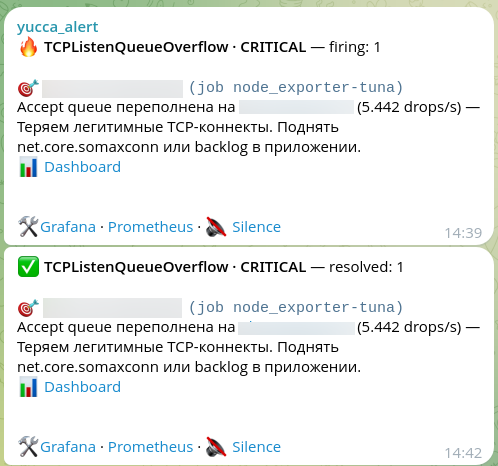
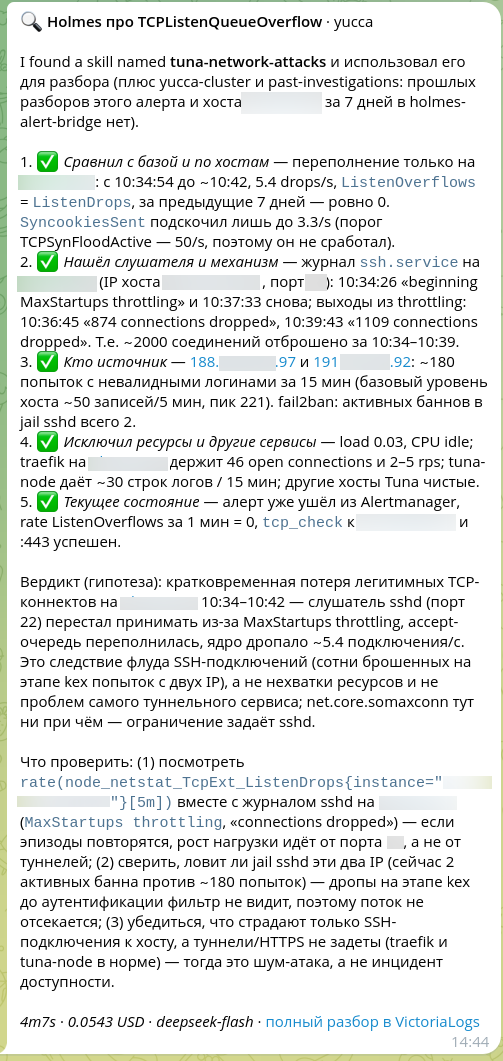
In four minutes, for five cents, Holmes came to a different conclusion:
- The overflow is on one host only, and there were none in the previous seven days. The SYN cookies counter barely moved, so it's not a SYN flood.
- The listener that stopped accepting connections is
sshd. Its journal has entries aboutMaxStartups throttlingkicking in and about dropped connections — around two thousand per episode. - The source is two addresses and roughly 180 login attempts with nonexistent usernames in 15 minutes.
- The host's resources are fine; the other services on it and the neighboring hosts aren't affected.
- The alert has already resolved, and the ports are responding.
Verdict: a brief loss of TCP connections caused by an SSH connection flood. The queue overflowed because sshd hit its own MaxStartups limit, not because the host ran out of resources; net.core.somaxconn has nothing to do with it. One more observation: fail2ban doesn't stop this kind of flood, because the connections are dropped before authentication.
The advice in the alert description would have sent the on-call engineer down the wrong path. The screenshot also shows two of our own sore spots described in this post: the line "no past investigations of this alert" — that very broken skill — and the agent's boilerplate preamble at the start of the message.
VirusTotal: noise or signal
We have an open-source tool that keeps an eye on how our IP addresses, published domains and build hashes look in antivirus databases and spam lists. The goal is to react before a user gets a "your software is malicious" warning.
Its hits come in two kinds. Most of the time it's noise: one or two little-known engines have flagged a tunnel server's address. Once in a while, it's a real signal. Now every hit comes with a Holmes verdict: a dedicated skill tells the agent which engines to treat as noise and which combinations of signs are a reason to call in a human.
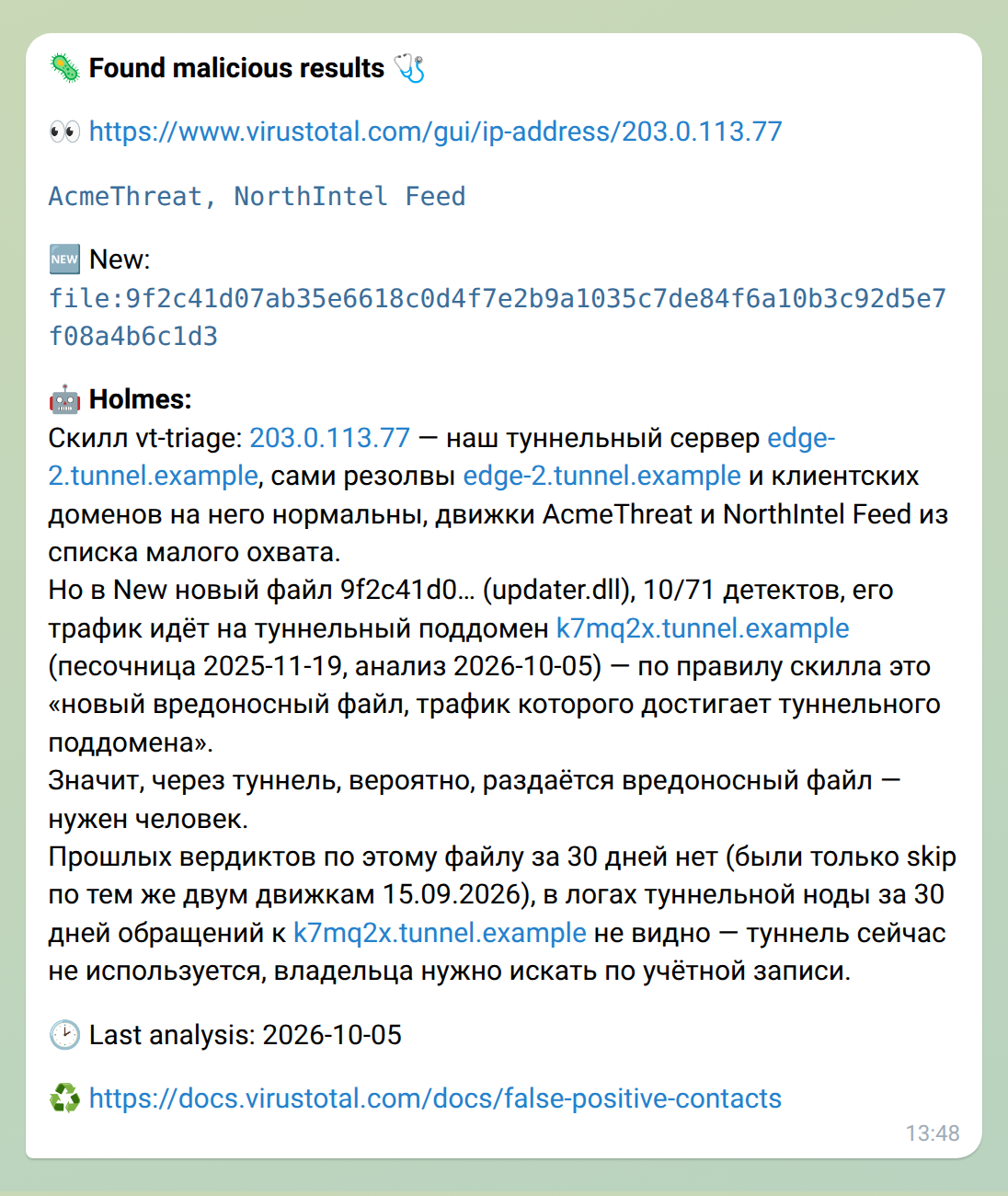
In this example, the agent first concluded that the hit on the address was noise from low-coverage engines. But it noticed a new file in the report, flagged by a sizable number of engines, that sends traffic to a tunnel subdomain — and escalated: a malicious file is probably being distributed through the tunnel, and a human needs to step in. Along the way, it checked that there were no past verdicts on this file and that the tunnel wasn't in use at the time, which means the owner has to be tracked down through their account.
This path goes to Holmes directly, bypassing the bridge — one more reason to keep a limit on the provider key.
Two more, briefly
- The agent investigated its own failure. After an upgrade, the new Holmes Pod went into CrashLoop, and the alert about it went to the old Pod. The old Pod found an access denied error on a new path in the secrets store, compared the environments of the two revisions and noted that the service wasn't down, because the old Pod was still alive. A minute and a half, ten cents.
- One alert, two different causes. In the Russian cloud project, the agent linked a memory shortage on a preemptible node to a scheduled replacement of a neighboring node and found a Pod that was using noticeably more memory than it had requested. Two days later, on the same alert, it named a different cause — overlapping CronJob schedules — and explicitly wrote how this episode differed from the previous one.
Pitfalls
A long-firing alert gets investigated again every day. The default deduplication window is 24 hours, so if an alert keeps firing longer than that, it dutifully gets investigated again. In one setup, these repeats ate up almost half the budget, and half of the production investigations came from a handful of chronically failing CronJobs. The cure works from both ends: increase the window (dedupWindow) to several days and finally fix whatever has been firing for weeks — a bill for investigations is very motivating.
The agent's boilerplate in messages. Holmes leaves placeholders in its answer for embedding charts in the Robusta UI: blocks like << {"type": "promql", ...} >> and images with the tool-image:// scheme. In a chat this looks like junk, and it showed up in more than half of the investigations. Starting with v0.11.1, the bridge strips them out before sending. The "I found a skill named…" preamble at the start of the answer is harder to get rid of: it's Holmes's own format for working with skills, and a rule in the system prompt has no effect on it.
The model breaks tool arguments. Every now and then, the model returns a call's arguments as a string with JSON inside instead of an object. Holmes fails on this with a validation error, and the whole investigation is lost — in one setup, this was the most common reason for failed investigations. In these cases, the bridge retries the investigation right away if the budget allows, and since v0.11.1, it logs when a retry didn't happen. At the end of September, these failures stopped on their own, with no changes on our side.
Alerts on the bridge itself. For a month, we had no rules at all on the bridge's metrics: throttled alerts and timeouts only showed up in the logs. The bare minimum:
- alert: HolmesBridgeInvestigationsFailing
  expr: increase(holmes_bridge_investigations_total{status!="ok"}[1h]) > 0
- alert: HolmesBridgeThrottling
  expr: increase(holmes_bridge_alerts_throttled_total[1h]) > 0
Don't add these alerts to the bridge's own allowlist.
Prices in modelList break the context window. Give a model your own prices, and Holmes 0.41 no longer knows its window size and fails on the very first tool call. The workaround is the OVERRIDE_MAX_CONTENT_SIZE variable. Version 0.42 no longer fails, but its default window is 200,000 tokens, so for long investigations it's still worth setting explicitly.
Tools run out of memory. On large lists, kubectl ran into the per-tool-call memory limit rather than the Pod's limit. That limit is set separately, with TOOL_MEMORY_LIMIT_MB.
Paired rules produce two investigations. If the allowlist has both a general rule and its specialized twin, a single incident gets investigated twice, seconds apart. Keep only one of the pair.
A "successful" investigation without a single query. On the old model, this happened twice: the agent read a couple of skills, made no queries to the data and confidently wrote that it had no access to metrics. Formally the investigation succeeded, and it cost a fraction of a cent. An abnormally cheap investigation is a reason to take a look at it yourself.
And one upside: group_wait is a free filter. In the international project, Alertmanager waits three minutes before the first notification, and out of dozens of production episodes, only a handful reached the agent — anything that lasts a minute or two resolves before then.
What's next
What we haven't measured yet — and we don't want to pretend we have:
- hypothesis quality — 90–95% remains an estimate until we label a sample of investigations against the actual causes of incidents;
- the effect on people — how much shorter incident investigations have become.
What we'd like to add to the bridge:
- a metric for money spent, so the budget is visible in Grafana alongside the other counters;
- smarter handling of long-firing alerts — a growing re-investigation interval instead of a fixed window;
- an API key for requests to Holmes;
- investigation links not only to VictoriaLogs but also to Loki, Elasticsearch and other stores;
- new delivery channels — Mattermost, Microsoft Teams, Discord.
What the bridge won't have: parallel investigations, routing rules (that's Alertmanager's job) and auto-remediation.
The code, chart and documentation are in the holmes-alert-bridge repository. If you try it out, let us know how it went: issues and merge requests are welcome.
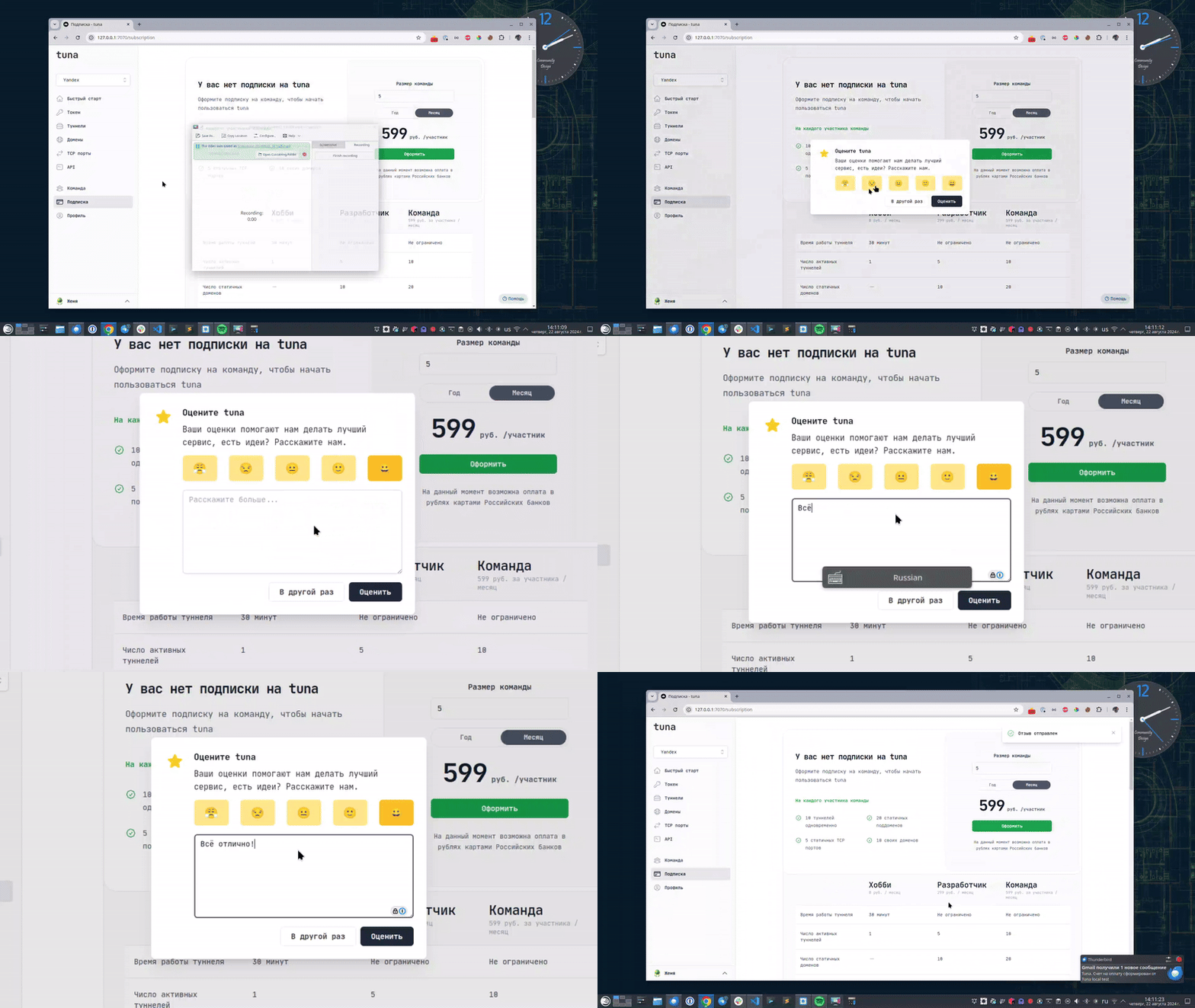
Leave feedback
If you enjoy using Tuna, or on the contrary you are not happy with something, please leave feedback.
News
We announce new features and posts on our Telegram channel. Subscribe so you don't miss anything.
Help
We value our users and carefully review every request. If you have any problems with tuna, please contact us in one of the following ways: